0 ratings




Item #:
22207060
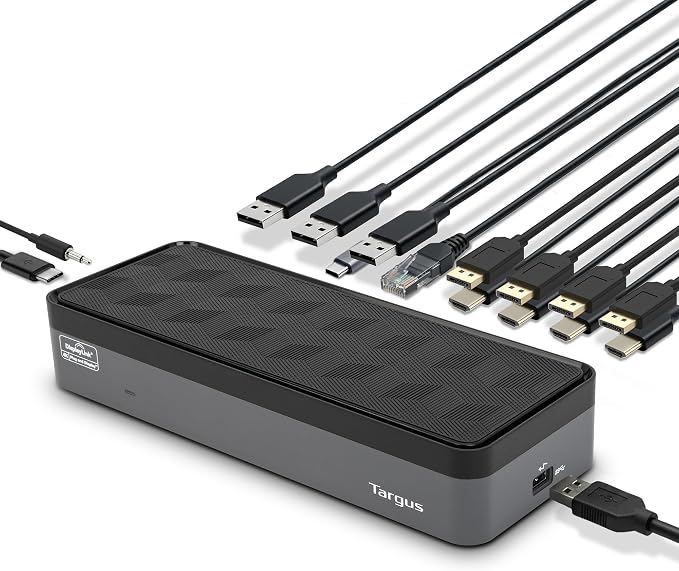
Targus USB-C Universal Quad 4K (QV4K) Docking Station with 100W Power Delivery, Black (DOCK570USZ)
90% of respondents would recommend this to a friend
Item #:
22207060
SHP 502
Price Details
Excluding Shipping & Custom charges ( Shipping and custom charges will be calculated on checkout )
*All items will import from US
26%
In stock
 Imported from USA store
QTY:
Only 19 items left in stock.
Order now and get it around Monday, September 14
Secured transaction
Ubuy works hard to protect your security and privacy. Our advanced payment security system ensures confidentiality by encrypting your information during transmission using AES (Advanced Encryption Standards) and SSL (Secure Socket Layer) protocols. Your payment details are 100% secure as we do not share your payment details with third party sellers.
Our Top Logistics Partners


Supports four 4K displays via four DisplayPort or four HDMI ports

Fast
Shipping

Free
Return*

Secure Packaging

100% Original Products

PCI DSS Compliance

ISO 27001 Certified



Note: Step 1 Voltage Transformer required for using electronics products of US store (110-120). Recommended power converters Buy Now.


What Stands Out
Quad 4K Support
Experience stunning visuals with support for four 4K displays, allowing seamless multitasking and enhanced productivity for demanding professionals and gamers.
100W Power Delivery
Provides efficient charging through USB-C, delivering up to 100W of power while simultaneously connecting your devices, ensuring your laptop stays charged during intensive tasks.
Universal Compatibility
Designed to work flawlessly with various USB-C devices, eliminating compatibility issues and making it an ideal choice for users with diverse tech ecosystems.
Product Details
| Hardware Interface | DisplayPort, Ethernet, HDMI, USB 3.0, USB 3.1 Type C |
| Compatible Devices | Notebook |
| Total Usb Ports | 5 |
| Number of Ports | 6 |
| Total Number of HDMI Ports | 4 |
| Wattage | 100 |
| Item Dimensions L x W x H | 3.5"L x 8.15"W x 1.69"H (8.9 x 20.7 x 4.3 cm) |
| Item Weight | 1.5 pounds (680 grams) |
| Color | Black |
| Brand | Targus |
| Number of Items | 1 |
| Number of Packs | 1 |
| Global Trade Identification Number | 00092636329662 |
| Unit Count | 1 Count |
| UPC | 092636329662 |
| Manufacturer | Tragus |
| Built-In Media | UNIV DOCK570 USBC QUAD 4K 100W GRY |
| Item Type Name | Docking Stattion |
| Model Number | DOCK570USZ |
| Mfr Part Number | DOCK570USZ |
| Total USB Ports | 5 |
| Product Dimensions (L x W x H) | 3.5"L x 8.15"W x 1.69"H (8.9 x 20.7 x 4.3 cm) |
| Total HDMI Ports | 4 |
What's in the box
UNIV DOCK570 USBC QUAD 4K 100W GRY
Who Should Buy?

-
Remote Workers
Ideal for remote professionals needing multiple connections for peripherals while maintaining a clean workspace.
-
Creative Professionals
Perfect for designers and videographers who require high-resolution outputs and efficient multitasking capabilities.
-
Tech-Savvy Users
Great for users looking for advanced connectivity options with power delivery for fast charging and device support.

-
Casual Users
Not ideal for basic users who only utilize standard USB ports without requiring high-resolution output.
Product Description
Have any Query? Chat with us
Customer Questions & Answers
-
Question:
What are the key features of the Targus USB C Universal Docking Station?
Answer: The Targus USB C Universal Docking Station is designed to enhance the functionality of your laptop or desktop by offering multiple connectivity options. Key features include support for quad 4K displays (up to 5K resolution on a single monitor), four DisplayPort outputs, USB-C compatibility, and various USB-A ports for additional peripherals. This docking station allows users to connect multiple monitors and devices with ease, making it ideal for multitasking professionals, gamers, or anyone looking to elevate their workstation. -
Question:
How do I connect my laptop to the Targus USB C Docking Station?
Answer: To connect your laptop to the Targus USB C Docking Station, simply use a USB-C cable to link the docking station to the USB-C port on your laptop. Once connected, the dock can provide power delivery, data transmission, and video output simultaneously. This streamlined process is perfect for users in industries requiring seamless transitions between different working setups, such as creative professionals who often move between locations. -
Question:
Can the Targus Docking Station support multiple displays, and how?
Answer: Yes, the Targus USB C Universal Docking Station supports multiple displays, specifically quad 4K monitors or a single 5K UHD display. This is achieved through its four DisplayPort outputs, which allow you to connect multiple screens to enhance productivity. Ideal for graphic designers or data analysts, the ability to view and work on multiple displays simultaneously can greatly increase workflow efficiency and provide a more immersive working experience. -
Question:
Is the Targus USB C Dock compatible with all laptops?
Answer: While the Targus USB C Universal Docking Station is designed to work with many laptops that have a USB-C port, compatibility may vary based on the specific laptop model and specifications. Users should check if their device supports DisplayPort Alt Mode through USB-C for optimal use. This makes the dock an excellent choice for users with both Windows and MacOS devices, ensuring ease of connectivity and usability across platforms. -
Question:
What type of power delivery does the Targus Dock offer?
Answer: The Targus USB C Universal Docking Station offers power delivery through its USB-C port, enabling you to charge your laptop while simultaneously using various peripherals. This eliminates the need for multiple chargers and reduces cable clutter on your desk. It's particularly advantageous for professionals who spend long hours at their workstation and rely on their devices staying charged throughout the day. -
Question:
Are there any additional USB ports on the Targus Docking Station?
Answer: Yes, the Targus USB C Universal Docking Station is equipped with several additional USB-A ports that allow users to connect a variety of peripherals, such as external hard drives, keyboards, or mice. This makes it incredibly versatile for different use cases, whether you’re a student needing to connect a mouse and keyboard for studying or a video editor requiring extra storage devices for projects. -
Question:
Does the Targus Docking Station require any software to operate?
Answer: The Targus USB C Universal Docking Station typically does not require additional software for basic functionality, as it is designed to work with standard USB-C connections. However, for advanced features or optimal performance, it’s recommended to check for and install any necessary drivers specific to your operating system. This ensures that users can tap into the full potential of the dock, enabling optimal performance in various applications. -
Question:
What resolutions can the Targus Docking Station support?
Answer: The Targus USB C Universal Docking Station supports impressive resolutions, including quad 4K (3840 x 2160) at 60Hz for multiple monitors or single 5K (5120 x 2880) for one display. This makes it particularly useful for professionals in fields such as graphic design, video editing, or any profession relying on high-resolution visuals, ensuring that your work is displayed with clarity and detail. -
Question:
Can I use the Targus Docking Station with a gaming laptop?
Answer: Yes, the Targus USB C Universal Docking Station is fully compatible with gaming laptops that have USB-C ports. It allows you to connect multiple monitors and devices, which can enhance the gaming experience by providing a wider field of view and quicker access to peripherals. Gamers often benefit from the dock's ability to create a more extensive and immersive setup, perfect for multitasking while gaming. -
Question:
Where can I buy the Targus USB C Universal Docking Station?
Answer: You can buy the Targus USB C Universal Docking Station from Ubuy, which offers a wide selection of tech products suitable for various needs. Ubuy provides an easy platform for purchasing quality retail gadgets, ensuring that you can access the docking station with just a few clicks while exploring other related tech accessories.
Targus Docking Stations DOCK570USZ Editorial Review


Targus USB-C Universal Quad 4K (QV4K) Docking Station with 100W Power Delivery, Black (DOCK570USZ) is designed for users seeking to connect multiple monitors seamlessly. Users frequently praise its ability to support up to four 4K displays without any degradation in image quality. This docking station has shown excellent compatibility with various devices, including laptops with limited ports, and is appreciated for its simplicity in setup and operation. Despite having shorter cables, which can be a minor inconvenience, most reviews highlight its robust performance and the ease with which it handles multiple peripherals, making it ideal for multitaskers who need a powerful docking solution.
Customer Reviews & Ratings
195 customers ratings
-
5 Star
73%
-
4 Star
11%
-
3 Star
5%
-
2 Star
2%
-
1 Star
9%
Review this product
Share your thoughts with other customers
Pros
- Supports up to four 4K monitors effortlessly
- Easy plug-and-play setup for quick use
- Compatible with various laptops including MacBooks
- Strong performance even under heavy multitasking
- Well-designed for accommodating multiple peripherals
Cons
- Short cables may limit installation options
Platform Trust & Buyer Confidence

JG
Jazz
Verified buyer
“Easy to use and always helpful and sorts any issues I've had past and present”
1 September 2026 · via Trustpilot
EK
Emmanuel
Verified buyer
“I always receive support when I engage customer service. Overall my experience with UBUY has been top notch. Keep up the good work.”
31 August 2026 · via Trustpilot
F
fnd
Verified buyer
“The delivery was fast and the product came undamaged and authentic.”
29 August 2026 · via Trustpilot
LC
Leana
Verified buyer
“Ubuy is extremely efficient and to order online is an easy process. The verity of products to buy is really unlimited! My order was urgent and I got it on time. The products are great! Thank you Ubuy!”
25 August 2026 · via Trustpilot
HL
Hengo
Verified buyer
“Fast, convenient and cheap. Great store!”
27 August 2026 · via Trustpilot
Secure Checkout
Global Delivery
Easy Returns
Genuine Products
Product Price History
Important information
- Limitations : For products shipped internationally, please note that any manufacturer warranty may not be valid; manufacturer service options may not be available; product manuals, instructions, and safety warnings may not be in destination country languages; the products (and accompanying materials) may not be designed in accordance with destination country standards, specifications, and labeling requirements; and the products may not conform to destination country voltage and other electrical standards (requiring use of an adapter or converter if appropriate). The recipient is responsible for assuring that the product can be lawfully imported to the destination country. When ordering from Ubuy or its affiliates, the recipient is the importer of record and must comply with all laws and regulations of the destination country.
- Not all the products listed on Ubuy are for sale, as Ubuy is a global search engine. Products are subject to export/trade regulations.
SHP 502
Order now and get it around Monday, September 14
This item is not restrict in my country.(Please click on above link if this item is not restrict in your country, So our team will review and allow.)
QTY:
Only 19 items left in stock.
Secured transaction
PCI DSS compliant and ISO 27001:2022 certified, with encrypted payments and full buyer protection on every order.
Our Top Logistics Partners
Fastest cross-border delivery
Features & Benefits
- Supports four 4K displays
- Thunderbolt 3 compatible
- Includes USB-C to USB-A Cable
- Power tips included to power various laptop brands
- Works with PCs, Macs, Chromebooks, Android Devices
- Compatible with Windows OS, Mac OS X, Android, Chrome, Ubuntu Linux
Ubuy Assurance
Experience worry-free shopping with 100% original products, PCI DSS-compliant payment security, ISO 27001-certified data protection, the fastest cross-border delivery, free returns *, and secure packaging on every order.