- Home Page /
- Electronics /
- Computer Accessories /
- Computer Accessories & Peripherals /
- Input Devices /
- Graphics Tablets /
- Drawing Tablet with Screen Artisul SP1603 15....
0 ratings




Item #:
41150412
Drawing Tablet with Screen Artisul SP1603 15.6", 128% sRGB, Scroll Wheel
Item #:
41150412
SHP 427
Price Details
Excluding Shipping & Custom charges ( Shipping and custom charges will be calculated on checkout )
*All items will import from US
4%
In stock
 Imported from USA store
QTY:
Only 10 items left in stock.
Order now and get it around Thursday, September 17
Secured transaction
Ubuy works hard to protect your security and privacy. Our advanced payment security system ensures confidentiality by encrypting your information during transmission using AES (Advanced Encryption Standards) and SSL (Secure Socket Layer) protocols. Your payment details are 100% secure as we do not share your payment details with third party sellers.
Our Top Logistics Partners


SP1603 drawing tablet adopts full-laminated tempered glass display. Seamless laminate between touch screen and display, reducing light loss caused by air layers while increasing precise cursor positioning, which makes your art clearer and brighter.

Fast
Shipping

Free
Return*

Secure Packaging

100% Original Products

PCI DSS Compliance

ISO 27001 Certified



Note: Step 1 Voltage Transformer required for using electronics products of US store (110-120). Recommended power converters Buy Now.


What Stands Out
High Pressure Sensitivity
With 8192 levels of pressure sensitivity, the Artisul SP1603 provides precise control and responsiveness, empowering artists to create detailed and intricate designs effortlessly on its vibrant display.
Full-Laminated Display
The full-laminated drawing screen reduces parallax and enhances color accuracy, ensuring a professional visual experience that closely mirrors traditional drawing methods for a seamless artistic workflow.
Wide Compatibility
Compatible with Windows, macOS, and Android, the Artisul SP1603 caters to a broad range of users, allowing artists to connect effortlessly across multiple platforms, enhancing versatility and usability.
Product Details
| Brand | Artisul |
| Model Name | Artisul SP1603 |
| Built-In Media | SP1603 Pen Display,P77 Digital Pen,Pen Case,Pen Stand,Pen Nib,Adjustable Stand,Mini HDMI Cable,2-in-1 USB-C Cable,Adapter,Quick Guide |
| Target Audience | Creators, artists, illustrator, Student, Teacher, ... |
| Model Number | Artisul SP1603 |
| Number of Items | 1 |
| Manufacturer | Artisul |
| Item Type Name | Drawing Tablet with Screen, Pen Display, Drawing Tablet with Monitor, Graphics Tablet |
| Mfr Part Number | SP1603 |
| Connectivity Technology | HDMI, USB, USB- C( USB3.1 Gen1, DP1.2) |
| Pressure Sensitivity | 8192 levels |
| Operating System | Windows 7/8/8.1/10/11 or later, MAC 10.12 or later, Android 6.0 or later(USB3.1Gen2 DP1.2) |
| Additional Features | Dail Controller, 60° Tilt Support, 128% sRGB, Extra-Slim, Full Lamination, 14 Shortcut Keys |
| Specific Uses For Product | Drawing, 3D Modelling, Animation, Designing, E-Signature, Editing, Online Education, Painting, Remote Work, Teaching, Writing, etc |
| Compatible Devices | Compatible with Windows, macOS, and Android |
| Display Type | LCD |
| Native Resolution | 1920x1080 |
| Screen Size | 15.6 inches (39.6 cm) |
| Item Weight | 3 pounds (1.36 kg) |
| Item Dimensions L x W | 18"L x 10.1"W (45.7 cm) |
| Active Surface Area | 15.6 inch (39.6 cm) |
| Color | SP1603-15.6inch (407201.6 cm) |
| Special Feature | Dail Controller, 60° Tilt Support, 128% sRGB, Extra-Slim, Full Lamination, 14 Shortcut Keys |
What's in the box
SP1603 Pen Display,P77 Digital Pen,Pen Case,Pen Stand,Pen Nib,Adjustable Stand,Mini HDMI Cable,2-in-1 USB-C Cable,Adapter,Quick Guide
Who Should Buy?

-
Digital Artists
Ideal for digital artists needing precise control over drawing with high pressure sensitivity and color accuracy.
-
Students Learning Art
Great for art students looking to practice and develop their skills in a professional drawing environment.
-
Graphic Designers
Perfect for graphic designers who require an intuitive way to create and edit digital artwork with a responsive display.

-
Casual Hobbyists
May not be suitable for casual users seeking a simple and affordable drawing solution without advanced features.
Product Description
Have any Query? Chat with us
Customer Questions & Answers
-
Question:
What are the key features of the Artisul SP1603 graphics drawing tablet?
Answer: The Artisul SP1603 features a 15.6-inch full-laminated display offering vibrant colors and clarity, making it an excellent choice for artists. It comes with a pressure-sensitive drawing pen that provides a natural writing and drawing experience. Additionally, it is compatible with both Windows and macOS systems, ensuring versatility for different users. This tablet is perfect for digital artists who need a portable yet powerful device for sketching, illustrating, or photo editing. -
Question:
Is the Artisul SP1603 compatible with popular design software?
Answer: Yes, the Artisul SP1603 is compatible with various popular design software such as Adobe Photoshop, Illustrator, CorelDRAW, and more. This compatibility ensures that artists can utilize the tablet efficiently with their preferred tools for drawing and design. Being able to use established software enhances artists' workflow, making it ideal for graphic design, digital painting, and animation tasks. -
Question:
How does the pressure sensitivity of the drawing pen work?
Answer: The drawing pen for the Artisul SP1603 offers up to 8192 levels of pressure sensitivity, allowing artists to create lines of varying thickness and opacity depending on how hard they press. This is crucial for detailed artwork, as it enables finer control and nuances in strokes. The responsiveness of the pen contributes to a realistic drawing experience, simulating traditional pencil or brush techniques. -
Question:
What are the benefits of the full-laminated display?
Answer: The full-laminated display on the Artisul SP1603 reduces parallax, making the drawing experience more intuitive. This means that the cursor on the screen is more accurately aligned with the pen, which minimizes any offset feel while drawing. Additionally, the laminated screen often leads to improved color accuracy and brightness, thereby enhancing the overall visual experience for digital artists. -
Question:
Can I use the Artisul SP1603 with Linux systems?
Answer: While the Artisul SP1603 is designed for compatibility with Windows and macOS, users have reported mixed results when trying to use it with Linux systems. It may be possible with specific drivers, but official support is not guaranteed. Artists working in Linux environments should consider checking community forums or guides for potential workaround solutions if they prefer using open-source systems. -
Question:
What types of artists would benefit from using the Artisul SP1603?
Answer: The Artisul SP1603 is suited for a variety of artists, including illustrators, graphic designers, and animators. Its portability makes it ideal for professional artists who travel as well as hobbyists seeking an affordable yet powerful drawing tablet. Additionally, students studying art and design can greatly benefit from its features, helping them develop their skills effectively in a digital format. -
Question:
How do I connect the Artisul SP1603 to my computer?
Answer: Connecting the Artisul SP1603 to your computer is straightforward. Simply plug the tablet into your PC or Mac using the provided USB-C cable. Once connected, install the necessary drivers from the Artisul website to ensure full functionality. This quick setup process allows you to start using the tablet within minutes, making it convenient for both new and experienced users alike. -
Question:
Is there any additional software included with the Artisul SP1603?
Answer: The Artisul SP1603 typically comes with a basic suite of software or software recommendations suitable for digital art and design. While specific software bundles may vary, artists are encouraged to explore additional tools for enhanced functionalities. This practice allows users to maximize their creativity on the tablet, making it suitable for various art styles and projects. -
Question:
What maintenance is required for the Artisul SP1603?
Answer: Maintaining the Artisul SP1603 involves regular cleaning of the screen with a microfiber cloth to prevent smudges and scratches. Additionally, ensure the drivers are updated periodically for optimal performance. This basic care keeps your tablet in excellent condition, allowing artists to focus on their work without the distractions of technical issues. -
Question:
Where can I buy the Artisul SP1603 graphics drawing tablet in Saint Helena?
Answer: You can purchase the Artisul SP1603 graphics drawing tablet through Ubuy, which offers a variety of products including this graphics tablet. Ubuy provides the convenience of online shopping, ensuring a smooth purchasing process while delivering quality products to your doorstep in Saint Helena.
Artisul Graphics Tablets Artisul SP1603 Editorial Review


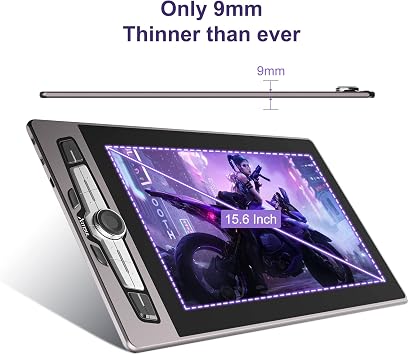
Drawing Tablet with Screen Artisul SP1603 15.6", 128% sRGB, Scroll Wheel | 14 Hot Keys | 9mm Ultra-Slim | Full-Laminated Drawing Monitor | 8192 Pressure | Works with Windows macOS PC | Android Support is a versatile tool for artists of all levels. Users appreciate its customizable hotkeys, which enhance workflow efficiency, and the smooth drawing surface that mimics paper texture. With a convenient screen size, it’s great for both beginners and seasoned artists looking for an upgrade. However, some might find the power cable a bit short, and those transitioning from lower-end models may need time to fully appreciate the extra features. The setup is quick, taking less than two minutes, making it user-friendly for first-time digital artists.
Customer Reviews & Ratings
225 customers ratings
-
5 Star
64%
-
4 Star
18%
-
3 Star
9%
-
2 Star
2%
-
1 Star
7%
Review this product
Share your thoughts with other customers
Pros
- Customizable hotkeys improve workflow efficiency
- Smooth drawing surface mimics paper texture
- Quick setup process, taking less than 2 minutes
- Screen size is ideal for beginners and pros
- Includes useful accessories like pen holder and stand
Cons
- Power cord could be longer for better reach
Platform Trust & Buyer Confidence

JG
Jazz
Verified buyer
“Easy to use and always helpful and sorts any issues I've had past and present”
1 September 2026 · via Trustpilot
EK
Emmanuel
Verified buyer
“I always receive support when I engage customer service. Overall my experience with UBUY has been top notch. Keep up the good work.”
31 August 2026 · via Trustpilot
F
fnd
Verified buyer
“The delivery was fast and the product came undamaged and authentic.”
29 August 2026 · via Trustpilot
LC
Leana
Verified buyer
“Ubuy is extremely efficient and to order online is an easy process. The verity of products to buy is really unlimited! My order was urgent and I got it on time. The products are great! Thank you Ubuy!”
25 August 2026 · via Trustpilot
HL
Hengo
Verified buyer
“Fast, convenient and cheap. Great store!”
27 August 2026 · via Trustpilot
Secure Checkout
Global Delivery
Easy Returns
Genuine Products
Product Price History
Important information
- Limitations : For products shipped internationally, please note that any manufacturer warranty may not be valid; manufacturer service options may not be available; product manuals, instructions, and safety warnings may not be in destination country languages; the products (and accompanying materials) may not be designed in accordance with destination country standards, specifications, and labeling requirements; and the products may not conform to destination country voltage and other electrical standards (requiring use of an adapter or converter if appropriate). The recipient is responsible for assuring that the product can be lawfully imported to the destination country. When ordering from Ubuy or its affiliates, the recipient is the importer of record and must comply with all laws and regulations of the destination country.
- Not all the products listed on Ubuy are for sale, as Ubuy is a global search engine. Products are subject to export/trade regulations.
SHP 427
Order now and get it around Thursday, September 17
This item is not restrict in my country.(Please click on above link if this item is not restrict in your country, So our team will review and allow.)
QTY:
Only 10 items left in stock.
Secured transaction
PCI DSS compliant and ISO 27001:2022 certified, with encrypted payments and full buyer protection on every order.
Our Top Logistics Partners
Fastest cross-border delivery
Features & Benefits
- Full-laminated tempered glass display
- Reduces light loss and increases precise cursor positioning
- Art is clearer and brighter
- Upgraded Pen Technology with 8192 pressure sensitivity
- Larger size and high color gamut for a better drawing experience
- 14 customizable shortcut keys and a dial for efficient creation
Ubuy Assurance
Experience worry-free shopping with 100% original products, PCI DSS-compliant payment security, ISO 27001-certified data protection, the fastest cross-border delivery, free returns *, and secure packaging on every order.