0 ratings




Item #:
221961078
TESmart 8K@60Hz DP KVM Switch 2 Monitors 2 Computers EDID, DP 1.4 KVM Switch Dual Monitor 4K@144Hz for Gaming Dock, Support USB3.0, Gigabit Network,
Item #:
221961078
SHP 685
Price Details
Excluding Shipping & Custom charges ( Shipping and custom charges will be calculated on checkout )
*All items will import from US
In stock
 Imported from USA store
Order now and get it around Monday, August 17
Secured transaction
Ubuy works hard to protect your security and privacy. Our advanced payment security system ensures confidentiality by encrypting your information during transmission using AES (Advanced Encryption Standards) and SSL (Secure Socket Layer) protocols. Your payment details are 100% secure as we do not share your payment details with third party sellers.
Our Top Logistics Partners


Experience dual 8K@60 vision with DP1.4, enhanced by TESmart's pioneering EDID emulation technology.

Fast
Shipping

Free
Return*

Secure Packaging

100% Original Products

PCI DSS Compliance

ISO 27001 Certified


Note: Step 1 Voltage Transformer required for using electronics products of US store (110-120). Recommended power converters Buy Now.


What Stands Out
Dual Monitor Support
Easily connect two monitors to enhance your gaming or work setup, providing a seamless dual display experience without sacrificing performance or resolution.
High Refresh Rate
Enjoy stunning visuals with 8K@60Hz and 4K@144Hz support, ensuring fluid graphics and an immersive experience for gaming and video editing.
Comprehensive Connectivity
Equipped with USB 3.0, Gigabit Network, and audio/mic support, this KVM switch meets all connectivity needs, streamlining your workspace with included cables.
Product Details
- Purpose-built for two DP 1.4 desktops and two DP 1.4 monitors, delivering a stable dual-monitor KVM solution. Designed without HDMI and USB-C inputs. For desktop+laptop setups, a direct USB-C to DP connection is recommended to minimize dock MST processing and power-related signal instability, or please explore TESmart USB-C+DP models (HDC202-P23, HDC203-PM24, HDC203-P24).
- Built for Broad Compatibility: This DisplayPort 1.4 KVM switch has undergone multiple brand-level tests during development, and our team continues to improve compatibility with third-party monitors, keyboards, and mice. If you experience issues with different device models, see the Troubleshooting Guide (PDF) under “Safety Documents” on this product page for more information.
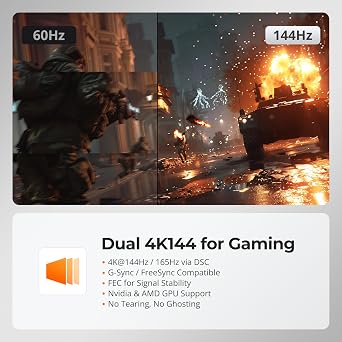
- Experience dual 8K@60 vision with DP1.4, enhanced by TESmart's pioneering EDID emulation technology. Enhanced with four technologies: G-Sync, FreeSync, FEC, and DSC
- Resolutions up to 8K (4320p)@60Hz: Resolutions up to 8K@60Hz are supported. It is backward compatible with 4K (2160p)@60Hz/120Hz/144Hz. DSC technology allows the transmission of 7680x4320@60Hz 4:4:4 and 3840x2160@144Hz resolutions
- EDID Emulators: With EDID emulators in each input port, your computers always receive the correct display information. Free you from the hassle of constantly adjusting display settings
- Ideal KVM for Gaming: Supports Dynamic HDR, including HDMI Dynamic HDR metadata, HDR10+, and Dolby Vision, providing higher dynamic range and color accuracy for more realistic display effects. It also supports Variable Refresh Rate (VRR), Fast Vactive (FVA), and Auto Low Latency Mode (ALLM), reducing screen tearing, stuttering, and input lag for a smoother experience
- Switching Made Easy: Our KVM offers 4 convenient switching options to suit your needs: keyboard hotkeys (customizable), front panel button, mouse wheel, and IR remote (AAA batteries not included). Effortlessly switch between sources and manage your devices with ease
- Integrated Microphone and L/R audio Output: You can listen to audio from one computer while working on the other or scan a document and save in another computer. Only need to press the front panel keys to operate audio, your headphones will stay 'active' during the switch and no longer have to stop or restart meetings
| Operation Mode | ON-OFF |
| Current Rating | 3 A |
| Operating Voltage | 12 volts |
| Contact Type | Normally Closed |
| Connector Type | Plug In |
| Switch Type | Push Button |
| Terminal | Screw |
| Circuit Type | 1-way |
| Mounting Type | Panel Mount |
| Number of Positions | 1 |
| Upper Temperature Rating | 50 °C |
| Controller Type | Push Button |
| Control Method | Push Button, Remote |
| Connectivity Protocol | Ethernet |
| Wattage | 36 watts |
| Control Type | Full |
| Compatible Devices | DisplayPort 1.4 compatible devices, including desktops, monitors, graphics cards, and various operating systems. |
| Color | Black |
| Item Dimensions | 7.5 x 4.9 x 2.08 inches (19.1 x 12.4 x 5.3 cm) |
| Unit Count | 1 Count |
| Number of Items | 1 |
| Material Type | Metal |
| Contact Material | Metal |
| International Protection Rating | IP41 |
| Specification Met | FCC |
| Brand Name | TESmart |
| Model | DKS202-M24-USBK-V2 |
| Manufacturer | TESmart |
| Included Components | KVM Switch |
| Part Number | DKS202-M24-USBK-V2 |
| Brand | TESmart |
| Material | Metal |
| Item dimensions L x W x H | 7.5 x 4.9 x 2.08 inches (19.1 x 12.4 x 5.3 cm) |
What's in the box
KVM Switch
Who Should Buy?

-
Gamers
Supports high refresh rates and resolutions, making it ideal for competitive gaming setups with dual monitors.
-
Content Creators
Perfect for users needing multiple monitors to manage editing software or streaming applications simultaneously.
-
IT Professionals
Facilitates easy switching between multiple computers for troubleshooting, system management, and technical support tasks.

-
Casual Users
May be too complex and feature-rich for users with basic computing needs or single-monitor setups.
Product Description
Have any Query? Chat with us
Customer Questions & Answers
-
Question:
What is the maximum resolution supported by the TESmart DP KVM Switch?
Answer: The TESmart DP KVM Switch supports an impressive maximum resolution of 8K@60Hz. This high resolution ensures that you can enjoy crisp and clear visuals, making it ideal for tasks that require detailed graphical work or high-end gaming. By utilizing DisplayPort 1.4 technology, the switch provides a seamless experience even at high refresh rates, perfect for both home office setups and gaming rigs. -
Question:
Can the TESmart DP KVM Switch be used with multiple computers?
Answer: Yes, the TESmart DP KVM Switch is designed to control two computers from a single set of peripherals. This benefit is particularly useful for professionals who need to switch between systems for productivity, as well as gamers who want to utilize different setups without the hassle of changing monitors or keyboards. The functionality enables a streamlined workspace and enhances efficiency. -
Question:
What is the benefit of the USB 3.0 connectivity in this KVM switch?
Answer: The inclusion of USB 3.0 connectivity in the TESmart DP KVM Switch allows for faster data transfer rates compared to previous USB versions. This feature is essential for tasks that require high-speed uploads and downloads, such as transferring large files or using bandwidth-intensive devices. This means you can connect and switch peripherals like external hard drives and webcams without any lag. -
Question:
How does the Hotkey Switch feature work on the TESmart DP KVM Switch?
Answer: The Hotkey Switch feature enables users to quickly toggle between the connected computers using keyboard shortcuts. This feature simplifies the switching process, allowing you to move from one system to another without needing to use physical buttons. It is particularly beneficial in fast-paced environments or during gaming sessions where every second counts. -
Question:
Is the TESmart DP KVM Switch suitable for gaming?
Answer: Absolutely! The TESmart DP KVM Switch is designed to accommodate gamers with support for resolutions up to 4K@144Hz. This capability ensures a smooth and fluid gaming experience, minimizing lag and enhancing response times. Gamers can switch seamlessly between systems while retaining high-performance visuals, making it an excellent addition to any gaming setup. -
Question:
What is EDID and how does it enhance user experience?
Answer: EDID, or Extended Display Identification Data, is a feature available in the TESmart DP KVM Switch that communicates the display capabilities of your monitors to the connected computers. This means that the switch can automatically optimize the resolution and refresh rates, ensuring you get the best possible quality. This feature simplifies setup and guarantees optimal performance across different displays. -
Question:
Can I use this KVM switch for home office setups?
Answer: Yes, the TESmart DP KVM Switch is perfect for home office setups. Its ability to manage multiple computers and monitors allows users to have a more organized and efficient workspace. The switch eliminates the clutter of multiple keyboards and mice and enables quick access to various systems, enhancing productivity, especially during multitasking. -
Question:
Does this KVM switch support audio switching as well?
Answer: Yes, the TESmart DP KVM Switch supports audio switching as part of its functionality. This feature allows users to switch audio output alongside video seamlessly, ensuring that you can enjoy multimedia content without needing extra audio cables or devices. This is especially beneficial for presentations, video conferences, or experiencing immersive sound while gaming. -
Question:
What types of cables are compatible with the TESmart DP KVM Switch?
Answer: The TESmart DP KVM Switch is compatible with DisplayPort 1.4 cables, which are recommended for optimal performance at 8K@60Hz resolutions. Additionally, it is designed to work with standard USB cables for peripheral connectivity. It's important to ensure that your cables meet the necessary specifications to take full advantage of the switch’s capabilities. -
Question:
Where can I buy the TESmart DP KVM Switch in Saint Helena?
Answer: You can purchase the TESmart DP KVM Switch from Ubuy in Saint Helena. Ubuy offers a reliable and convenient shopping experience where you can find this advanced KVM switch along with other accessories. Additionally, Ubuy often features customer reviews, detailed product descriptions, and variations, ensuring you have all the information needed before making your purchase.
TESmart KVM Switches Editorial Review


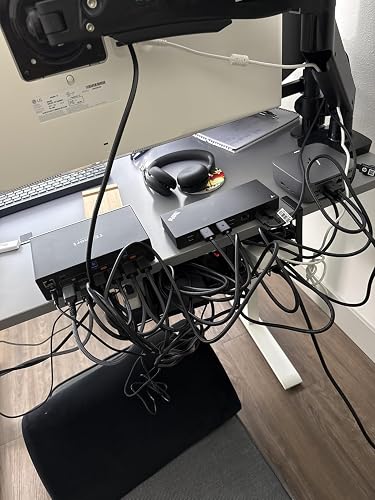
**** The TESmart DP KVM Switch for triple monitors has garnered attention for its capability to manage high-resolution displays seamlessly and effectively. Users report significant improvements in display performance, especially for multi-monitor setups like dual LG DualUp monitors with a resolution of 2880x2560 at 10-bit color depth and 60Hz. The KVM switch maintains stable window arrangements across switching cycles, effectively resolving window repositioning issues that plagued some users with previous high-end models. This makes it an appealing choice for both gaming enthusiasts and professionals in home office environments. However, the experience with USB peripherals connected to the KVM has received mixed reviews. While the specialized HID ports provide reliable connections for keyboards and mice without disconnections, they pose limitations for users who want to connect multiple input devices. Those who tried to utilize USB hubs or more than two HID devices faced connectivity issues. Some reported needing to unplug and re-plug dongles frequently to restore proper function, leading to frustration among those dependent on multiple peripherals. Additionally, there seems to be compatibility hitches when switching between systems with distinct display capabilities, particularly concerning G-Sync settings. Users noted instances when switching from a G-Sync-compatible computer to one that wasn't resulted in occasional monitor blackouts. Despite these shortcomings, many customers still Consider the TESmart KVM Switch a solid investment for those needing to manage multiple high-resolution displays and computers efficiently, particularly given its relatively competitive price point. **
Customer Reviews & Ratings
62 customers ratings
-
5 Star
50%
-
4 Star
21%
-
3 Star
12%
-
2 Star
7%
-
1 Star
10%
Review this product
Share your thoughts with other customers
Pros
- Excellent display performance with high-resolution monitors.
- Maintains stable window positions across switching cycles.
- Good handling of dual high-bandwidth outputs.
- Fairly easy to set up and use.
Cons
- Limitations on USB HID ports for peripheral connections.
Platform Trust & Buyer Confidence

MA
Mohammad
Verified buyer
“Excellent quality and original too,when ubuy send original things I will appreciate that ,I very satisfied thank you”
23 July 2026 · via Trustpilot
CK
Chitra
Verified buyer
“The order and delivery progress was communicated very well. Package arrived within the estimated time. Products arrived as expected in good condition.”
22-Jul-26 · via Trustpilot
K
kund
Verified buyer
“Good supply of products. Safe payment methods, and shipment worldwide! Genuine products.”
23-Jul-26 · via Trustpilot
OO
Onesi
Verified buyer
“Was my first time buying a product from Ubuy, but I found it so helpful. This is reliable. Gonna place a new order!”
22 July 2026 · via Trustpilot
SJ
SAO JOHN
Verified buyer
“Ubuy is a great online platform to buy stuff. Reliable, fast delivery time and great value for money. I've been using Ubuy online shopping platform for three years now and will continue to do so.”
23 July 2026 · via Trustpilot
Secure Checkout
Global Delivery
Easy Returns
Genuine Products
Product Price History
Important information
- Limitations : For products shipped internationally, please note that any manufacturer warranty may not be valid; manufacturer service options may not be available; product manuals, instructions, and safety warnings may not be in destination country languages; the products (and accompanying materials) may not be designed in accordance with destination country standards, specifications, and labeling requirements; and the products may not conform to destination country voltage and other electrical standards (requiring use of an adapter or converter if appropriate). The recipient is responsible for assuring that the product can be lawfully imported to the destination country. When ordering from Ubuy or its affiliates, the recipient is the importer of record and must comply with all laws and regulations of the destination country.
- Not all the products listed on Ubuy are for sale, as Ubuy is a global search engine. Products are subject to export/trade regulations.
SHP 685
Order now and get it around Monday, August 17
This item is not restrict in my country.(Please click on above link if this item is not restrict in your country, So our team will review and allow.)
QTY:
Secured transaction
PCI DSS compliant and ISO 27001:2022 certified, with encrypted payments and full buyer protection on every order.
Our Top Logistics Partners
Fastest cross-border delivery
Features & Benefits
- Supports dual 8K@60Hz resolution for stunning visuals.
- Features EDID emulators to ensure optimal display settings.
- Ideal for gaming with support for Dynamic HDR and Variable Refresh Rate.
- Offers four convenient switching options (keyboard, button, mouse wheel, IR).
- Compatible with a wide range of third-party monitors, keyboards, and mice.
- Integrated audio outputs allow seamless audio management between two computers.
Ubuy Assurance
Experience worry-free shopping with 100% original products, PCI DSS-compliant payment security, ISO 27001-certified data protection, the fastest cross-border delivery, free returns *, and secure packaging on every order.